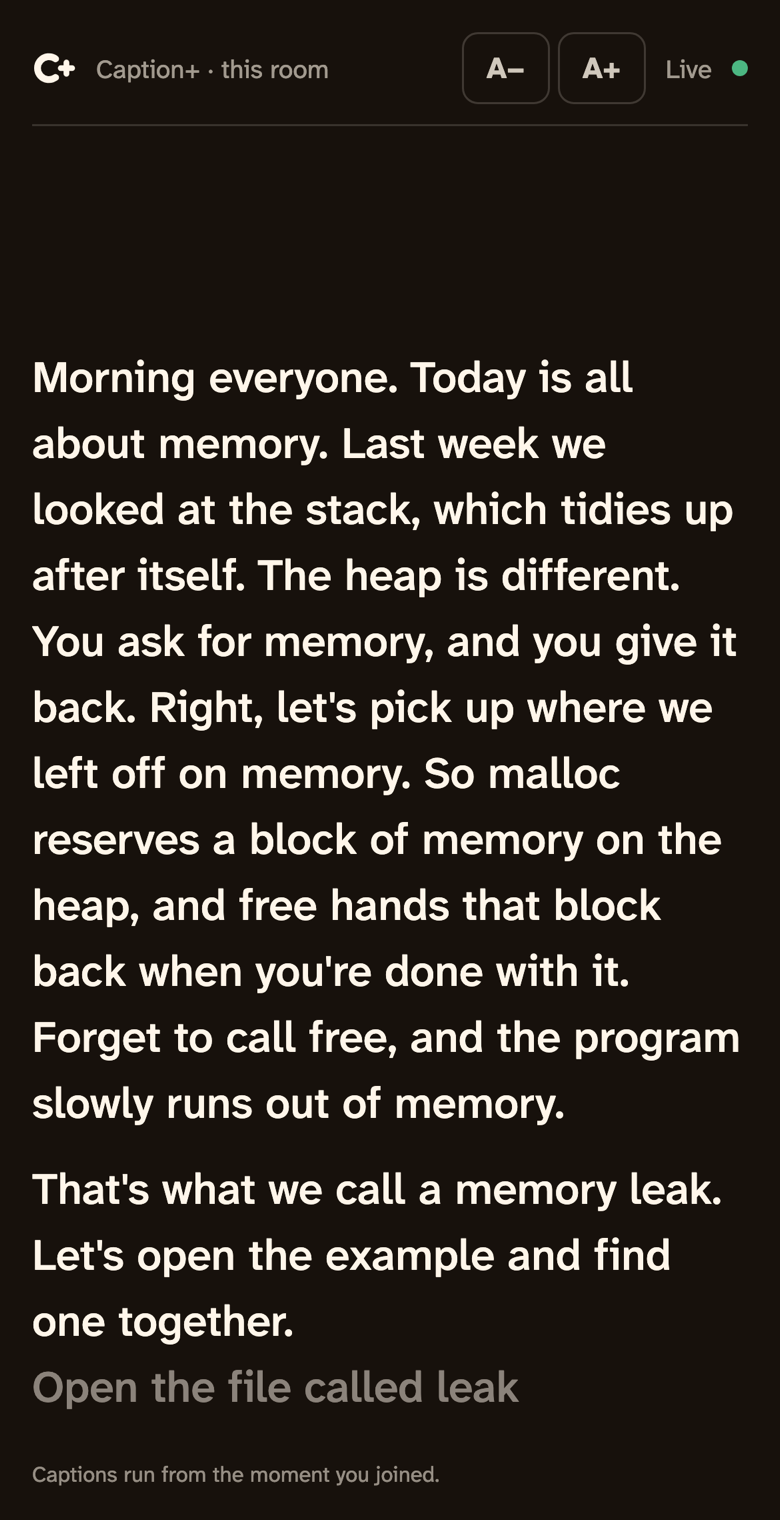
We put live subtitles on the big screen (even with the Wi-Fi off), over the slides, a website or a video, in a floating window, and on students' own phones, as the lecturer speaks.
Turn it with the Up and Down arrow keys, the mouse wheel, or by dragging.So everyone in the room can read the lecture, including deaf students.
Tuned to run efficiently, and locally, on Apple's M-series chips. Mac only.
- Lecturer's Mac. The subtitles are made here.
- Big screen. Subtitles over the slides.
- Students' own devices. On the room's network.
- No cloud. The audio stays on the lecturer's Mac.
What is Caption+?
It turns what the lecturer says into live subtitles on the big screen at the front of the room, so everyone can read them, including deaf students.
It runs on the lecturer's own Mac, and the audio does not leave the laptop. Mac only: it is tuned to run efficiently, and locally, on Apple's M-series chips.
Who makes it?
A Deaf founder, who has read subtitles his whole life.
Backed by the UAL Social Purpose Innovation Fund and a London Social Ventures build grant. Pitch It winner. Stephen Lloyd Awards finalist. Tata Varsity Pitch 2026 finalist.
How does a lecturer use it?
- Plug in the mic. Connect it to the laptop running the slides.
- Press start. Subtitles appear on the big screen and in a floating window you can move anywhere.
- Keep the transcript. It is ready when the lecture ends.
New words arrive grey, like these, then settle.
What do students see?
The lecture as text, on the big screen and on their own devices on the room's network.
Does it need the internet?
No. It keeps working with the Wi-Fi off, and the audio does not leave the laptop.
Check it yourself: turn the Mac's Wi-Fi off before you press start. The subtitles on the big screen carry on.
Sharing to students' phones uses the room's network, not the internet.
Caption+ stores no audio.
What does it need?
A Mac with Apple silicon (M1 or later) and macOS 14 or newer, and a mic connected to the Mac running the slides.
The app is signed and checked by Apple.
What does it cost?
£99 a year, or £19.99 a month.
Pay yearly and it works out at about £8 a month. Pay monthly and you can stop whenever you like.
Universities can ask us about licensing it by the room.
We are working to make it available through Disabled Students' Allowance (DSA) funding. It is not available that way yet.
How do I get it?
Tell us who you are and we will reply by email within a few days.